


Copying Ad Groups is a common and highly effective way to expand a successful keyword theme to a new location or a new test campaign while keeping the tight structure (keywords, ads, and landing pages) intact.
You can perform this action directly in the Google Ads web interface.
Here is the detailed step-by-step guide on how to copy Ad Groups between campaigns:
Step 1: Locate and Copy the Ad Groups
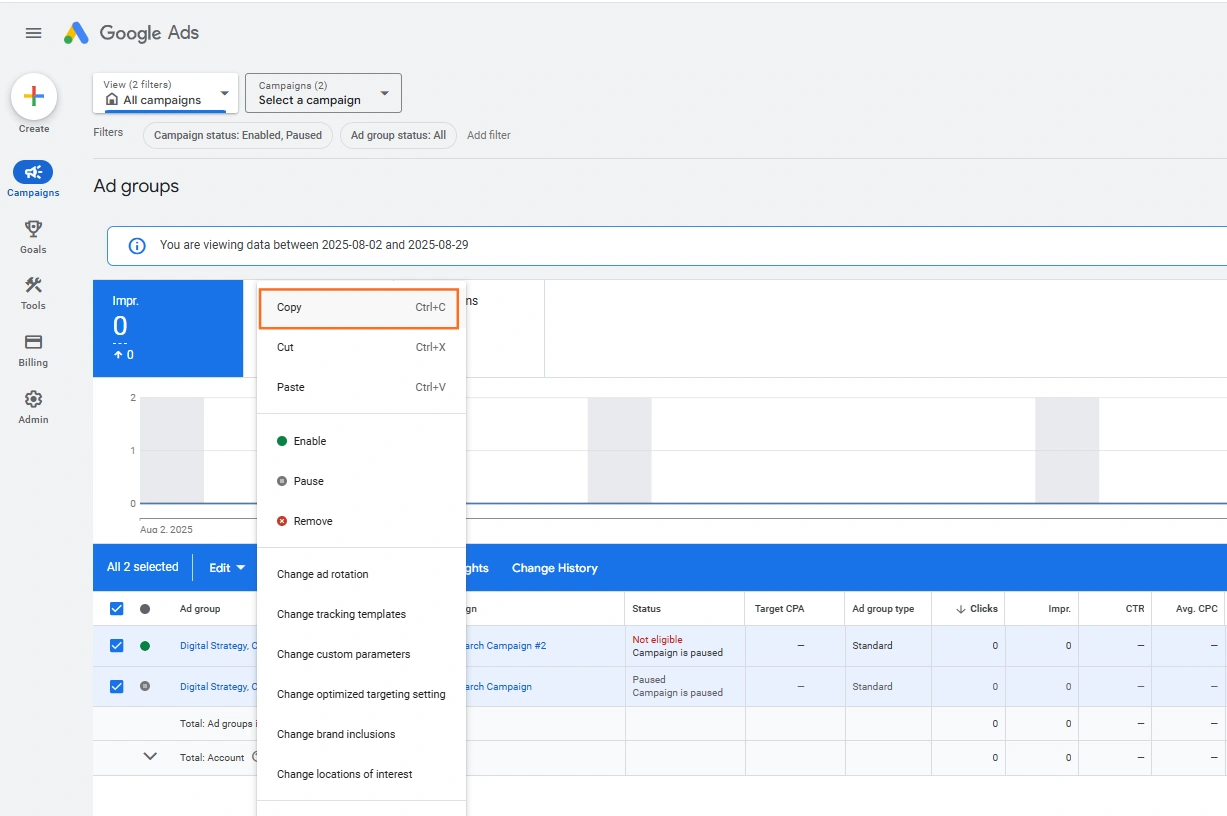
- Navigate to Ad Groups: In your Google Ads account, click on Campaigns in the left-hand menu, and then click Ad groups.
- Tip: Use the campaign filter above the table to quickly show only the Ad Groups from the source campaign you want to copy from.
- Select Ad Groups: Check the box next to the Ad Group(s) you want to copy.
- Copy: Click the Edit drop-down menu that appears in the blue bar above the table. Select Copy (or use the keyboard shortcut Ctrl+C on a PC, Cmd+C on a Mac).
Step 2: Paste into the Destination Campaign
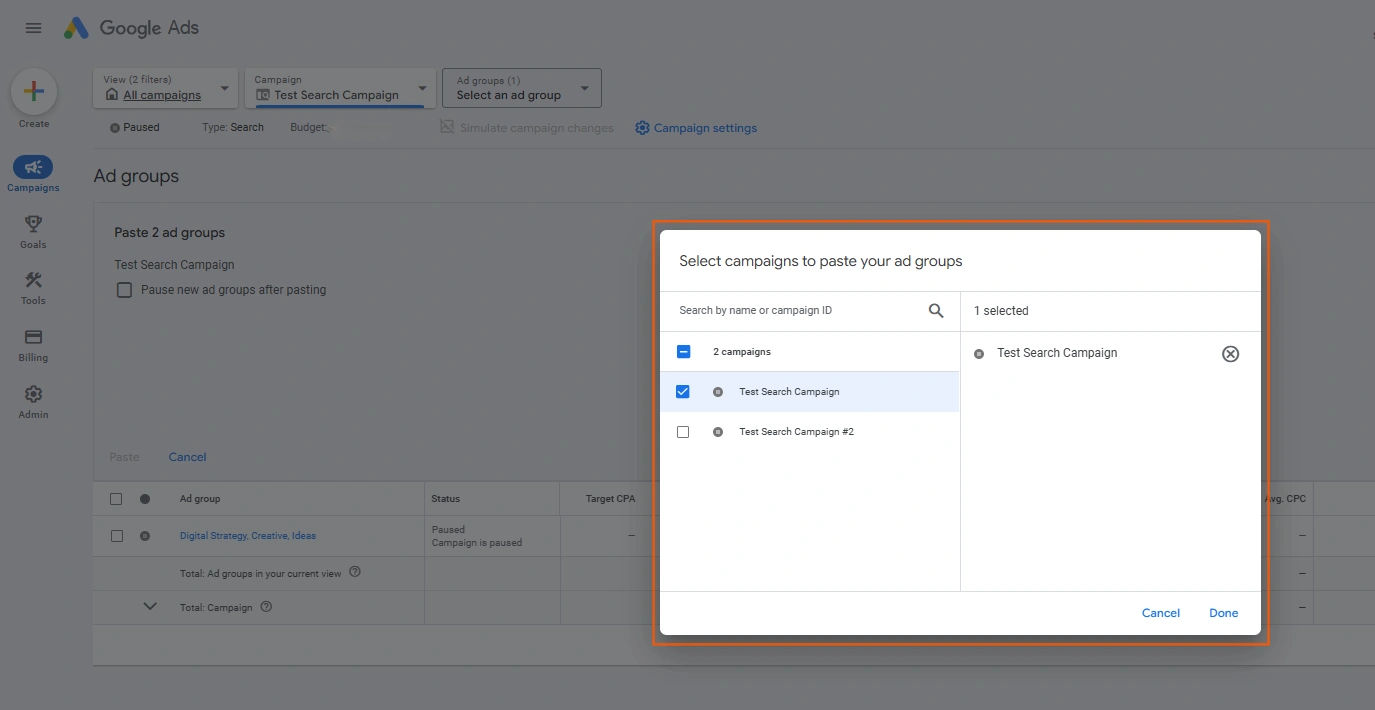
- Paste: Click the Edit drop-down menu again and select Paste (or use the keyboard shortcut Ctrl+V or Cmd+V).
- Select Destination: A Paste pop-up box will appear. You need to use the Campaign picker to choose the campaign you want to paste the Ad Group(s) into.
- Set Status: You will see a checkbox option: “Pause new ad groups after pasting.”
- Advice: Always check this box. It’s safest to paste the new Ad Groups as Paused so you have time to review their settings (especially final URLs and keywords) before they start running and spending money.
- Confirm Paste: Click Paste. The Ad Group(s) will be duplicated, complete with all their internal keywords, Responsive Search Ads (RSAs), and settings.
What is Copied (and What to Change)
When you copy an Ad Group, you copy the entire structure inside it.
| Element Copied | Always Check/Change | Rationale/Best Practice |
| Ad Group Name | Rename immediately. The new Ad Group will be named [Original Name] – Copy. Rename it to reflect its new purpose (e.g., if you copied ‘Boiler Repair’ to a new London campaign, rename it ‘London – Boiler Repair’). | |
| Keywords | Review the list. The keywords and their match types are copied exactly. | Ensure the keywords still make sense under the new campaign’s theme (e.g., if the destination campaign is Exact Match only, remove the Broad/Phrase keywords from the pasted group). |
| Ads (RSAs) | The full set of Responsive Search Ads (RSAs) is copied. | Critical: If the new campaign targets a different location or offer, edit the Ad Text to reflect that. For example, change ‘Manchester’s Best Plumbers’ to ‘Liverpool’s Best Plumbers’. |
| Final URLs | The final URLs are copied exactly from the source Ad Group. | Crucial: Always check the Final URL to ensure it lands on the most relevant page for the destination campaign’s goal. |
| Ad Group Bid | The default bid set on the Ad Group is copied. | If the new campaign uses a different bidding strategy (e.g., Target CPA), this inherited bid will be ignored, but it is good practice to ensure it is set correctly. |
 Google Ads
 Search Engine Optimisation
 About Us