


Where to Find the Campaign Settings Menu
The Campaign Settings menu is your control panel for budgets, locations, networks, and bidding strategy.
The Fastest Way
This method is the quickest for changing the settings of a single campaign directly from the main campaigns list.
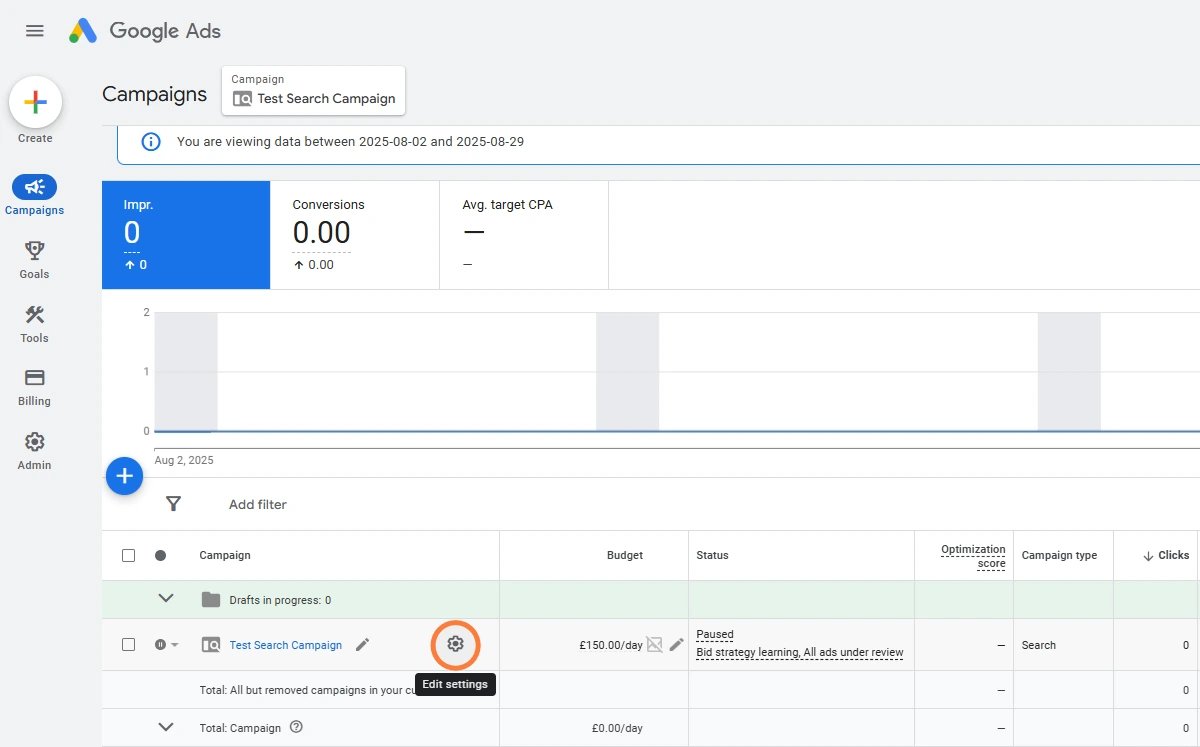
- Navigate to Campaigns: Go to the Campaigns section in the left-hand menu.
- Locate the Campaign: Find the campaign you want to edit (e.g., “Test Search Campaign” in our screenshot).
- Click the Icon: You can either:
- Click the Campaign settings icon next to the campaign’s name (if you are viewing that campaign).
Clicking this icon immediately opens the full list of settings for that campaign, saving you a click on the campaign name and another click on the ‘Settings’ tab.
 Google Ads
 Search Engine Optimisation
 About Us