


Step 1: Duplicate the Campaign in the Google Ads Interface
This is the fastest method and copies all settings, ad groups, keywords, and ads from the original campaign.
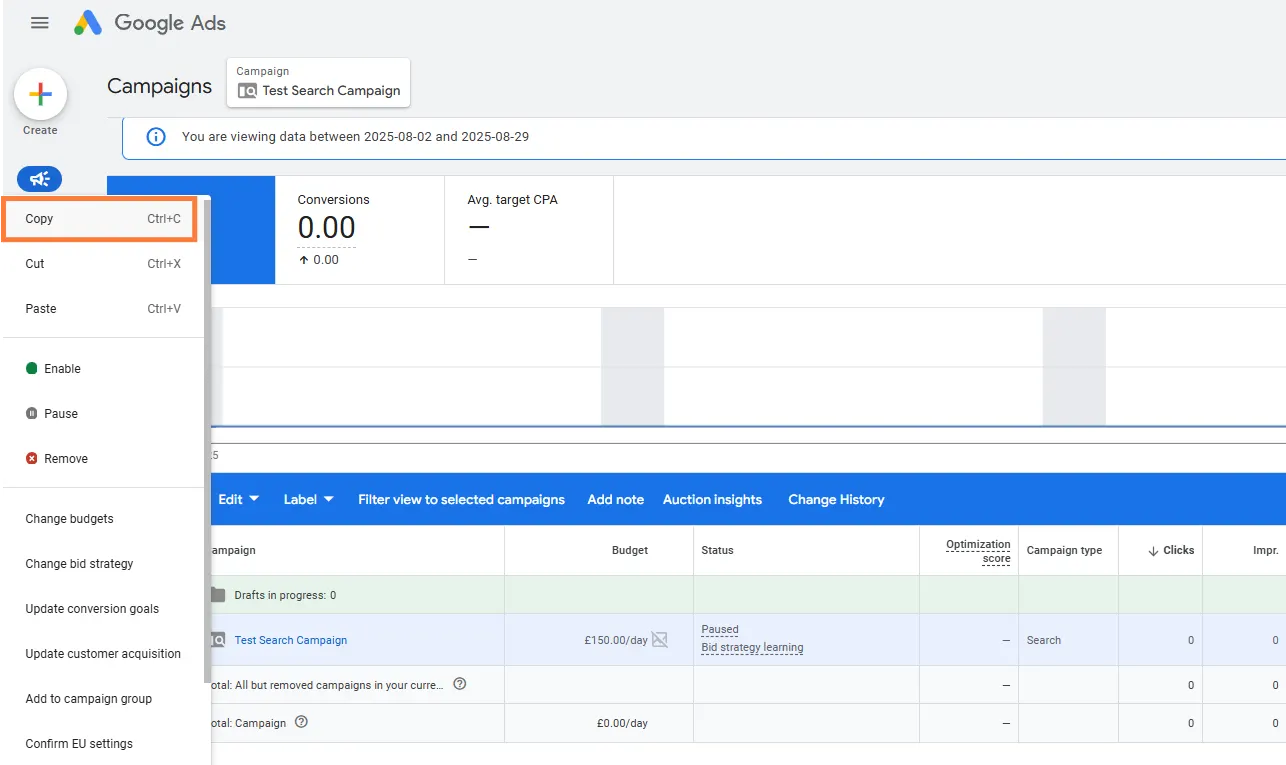
- Navigate to Campaigns: In your Google Ads account, click on Campaigns in the left-hand navigation menu.
- Select Campaign: Find the campaign you wish to duplicate and click the checkbox next to its name.
- Copy: Go to the Edit drop-down menu (or use the shortcut Ctrl+C on a PC, Cmd+C on a Mac) and select Copy.
- Paste: Go back to the Edit drop-down menu and select Paste (or use Ctrl+V or Cmd+V).
- Set Paste Options: A box will appear with paste options.
- Crucial Step: Check the box that says “Pause new campaigns after pasting.” This prevents the duplicated campaign from starting immediately and competing against your original campaign (cannibalisation).
- Confirm: Click Paste.
Step 2: Essential Post-Duplication Checks (Avoiding Errors)
The biggest mistake is leaving the campaign paused and forgetting about it, or enabling it without making these essential changes. You must check the following settings immediately to prevent errors, policy violations, or competition with your original campaign.
2.1 Renaming the Campaign
- Action: Click the new campaign’s name and then click Settings. Rename it immediately to reflect its new purpose.
- Advice: Use a clear naming convention that defines the single change you are testing.
- Testing example: Search – UK – Max Conversions – V2 (if testing new bid strategy).
- Location example: Search – London – Generic Keywords (if targeting a new area).
2.2 Reviewing Core Settings (The BIG 3)
Setting | Why it MUST be Checked | Action to Take |
Budget | The budget is copied exactly. You must decide if you want the same amount or a reduced/increased amount for testing | Set the Average Daily Budget to the desired amount. If you are A/B testing, ensure the budget reflects a fair split (e.g., if total budget is £100, give each campaign £50). |
Locations | If you are testing a new city or country, you must change this setting now. | In Settings > Locations, update or add the new geographical target (e.g., remove ‘Manchester’ and add ‘Birmingham’). |
Start/End Dates | If the original campaign had a limited run, the new campaign will copy those dates. | Check Settings > Start and end dates. If you are running a perpetual campaign, ensure it has No end date. If you are running a seasonal test, set a new future end date. |
2.3 Reviewing Ad Groups and Ads
Element | Why it MUST be Checked | Action to Take |
Keywords | If you are duplicating to test a different type of keyword (e.g., Exact Match vs. Broad Match), the duplicate will contain the original list. | Remove the irrelevant keywords or change their Match Type in the new Ad Groups. |
Ad Copy (RSAs) | If you are testing a new message or offer, the duplicated ads will be identical to the original. | In the Ads & Assets section, go into the duplicated Responsive Search Ad (RSA) and edit the headlines/descriptions to reflect your test. You must change at least 5 headlines and 2 descriptions for a valid A/B test. |
Negative Keywords | Negative Keyword lists are often applied at the Campaign Level and are copied. Opinion: A negative keyword that is great for your generic campaign may conflict with your branded campaign. | Review the Negative Keywords list in the Keywords section. Remove any term that now conflicts with the goal of the new duplicate campaign. |
Duplication Best Practices and Stats
Practice | Details and Opinion | Stat/Benefit |
A/B Testing | Duplication is perfect for testing. You should only ever change one major variable (e.g., location, bid strategy, or ad copy) in the duplicate campaign so you can isolate the result. | Isolation: Changing only one variable gives you $\text{95}\%$ confidence in the A/B test results. |
Use Google Ads Editor | For power users managing multiple accounts or wanting to duplicate many campaigns at once, the free Google Ads Editor desktop tool is far faster and more efficient for bulk copying and pasting. | Efficiency: Using the Editor can reduce the duplication time for a large account from hours to minutes. |
Cannibalisation Risk | Crucial: If you run two identical campaigns at the same time, they will compete against each other in the auction, driving up your Cost-Per-Click (CPC). | Avoidance: By pausing the original and only running the duplicate (or using Campaign Experiments), you prevent this internal competition. |
 Google Ads
 Search Engine Optimisation
 About Us