


The Google Keyword Planner (GKP) is a free tool housed within the Google Ads platform. It is essential for determining keyword difficulty, estimating search volume, and discovering new keyword ideas. While GKP is designed for advertisers, anyone with a Google Account can access it for free, although full, precise search volume data requires an active, running ad campaign.
Step 1: Setting up Free Access
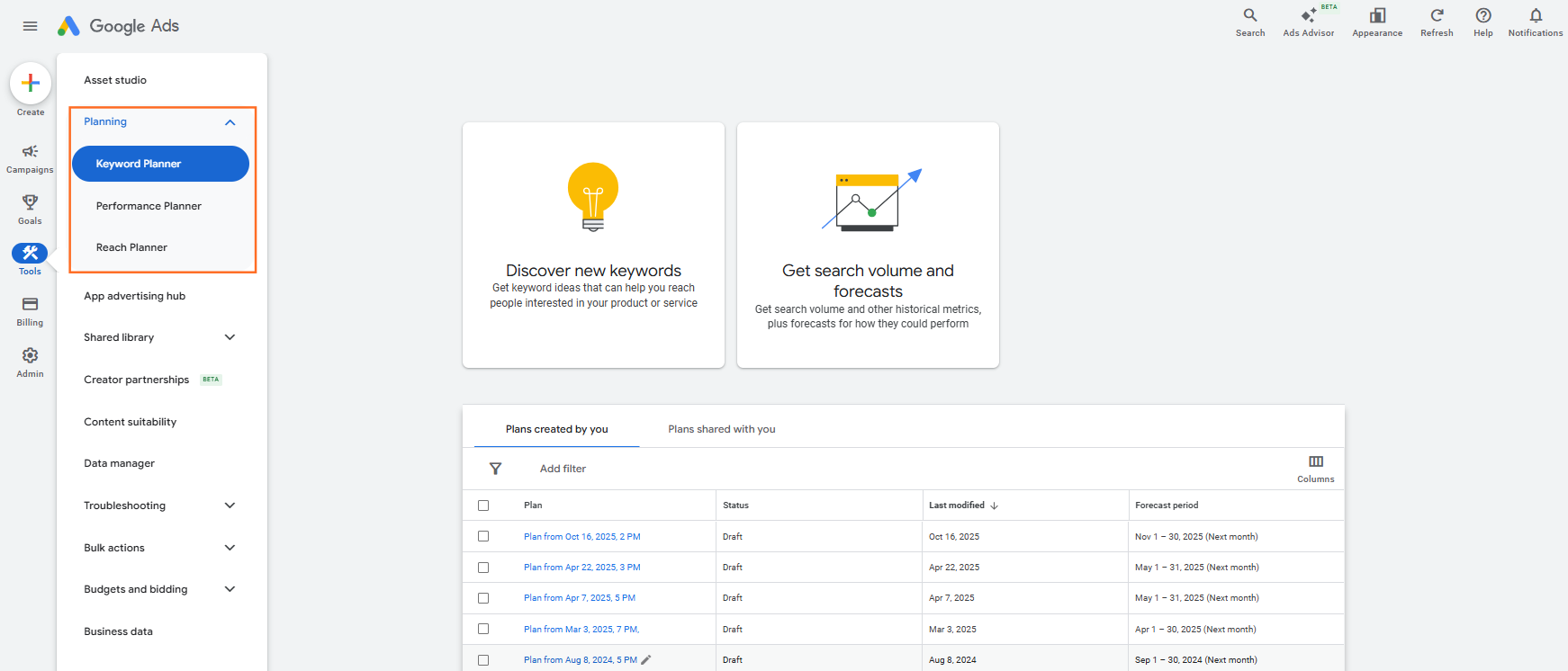
You do not need to spend money on ads to access the basic functionality of GKP.
- Create a Google Account: If you don’t have one, create a standard Google account.
- Access Google Ads: Navigate to the Google Ads platform and sign in with your Google Account.
- Skip Campaign Creation: When prompted to create your first campaign, look for a small text link at the bottom that says “Create an account without a campaign”.This is the key to free access.
- Confirm Settings: Confirm your billing country, time zone, and currency (ensure this is set to GBP for UK analysis).
- Navigate to Tools: Once the account dashboard is loaded, Go to Tools > Planning > Keyword Planner.
Step 2: Optimal Free GKP Functions for SEO
The free version of GKP provides two primary, highly valuable functions for your SEO strategy.
1. Discover New Keywords
This function helps broaden your keyword research beyond your initial ideas.
- Input: Enter a few seed keywords (e.g., “optimal digital strategy,” “UK B2B lead generation”) or a competitor’s website URL.
- Optimal Filtering:
- Location: Crucially, change the location filter from “United Kingdom” to a specific target city (e.g., “London” or “Manchester”) to gather local search data.
- Date Range: Use the highest available range (e.g., “Last 12 months”) to get the best average data.
- Output: GKP generates hundreds of related keyword ideas that you can export.
2. Get Search Volume and Forecasts
This function allows you to quickly upload and analyze a list of keywords.
- Input: Paste or upload your curated list of potential keywords.
- Output: GKP provides traffic forecasts and, more importantly, the crucial search volume metrics (see next section).
Step 3: Deciphering the Free Search Volume Data
The main limitation of the free account is that Google replaces precise volume with ranges. Our advise to interpret these ranges effectively:
| GKP Volume Range | Optimal Interpretation | Strategic Implication |
| 0 – 10 | Very low volume; likely a hyper-specific, long-tail query. | Target if highly relevant and conversion-focused; easy to rank for. |
| 10 – 100 | Low to moderate volume. Excellent for niche or new services. | Good for blog posts or detailed guides; manageable competition. |
| 100 – 1K | The Optimal Sweet Spot for most B2B terms. | Represents good traffic potential without extreme competition. Focus core pages here. |
| 1K – 10K | High volume, broad commercial intent (e.g., “SEO Audit”). | High competition. Target with high-authority pages and significant internal linking. |
| 10K – 100K+ | Extremely high volume (e.g., “Digital Marketing”). | Target with informational content or as a long-term goal for the homepage. |
Optimal Tip: Even the free GKP data is more reliable than estimates from many third-party tools, as it comes directly from Google’s search data.

 Salesforce

