


Submitting a sitemap to Google is a critical step after adding your website to Google Search Console (GSC). A sitemap is a file that lists all the pages, videos, and other files on your site that you want Google to know about. It acts as a roadmap for Google’s crawlers, helping them find and index your content more efficiently.
Step-by-Step Guide
Step 1: Find Your Sitemap URL
Before submitting, you need the correct URL of your sitemap file.
- Check the Common Location: For most modern websites, especially those built on a Content Management System (CMS) like WordPress or Shopify, the sitemap is usually located at one of these URLs:
- yourwebsite.co.uk/sitemap.xml
- yourwebsite.co.uk/sitemap_index.xml (common with SEO plugins)
- Verify: Visit that URL in your browser. If you see a page listing all your internal pages, you have the correct file.
- Note: You only need the part of the URL after your main domain (e.g., just sitemap.xml).
Step 2: Navigate to Sitemaps in GSC
- Sign in to your Google Search Console account.
- Select the website property you want to work on from the property selector dropdown in the top-left corner.
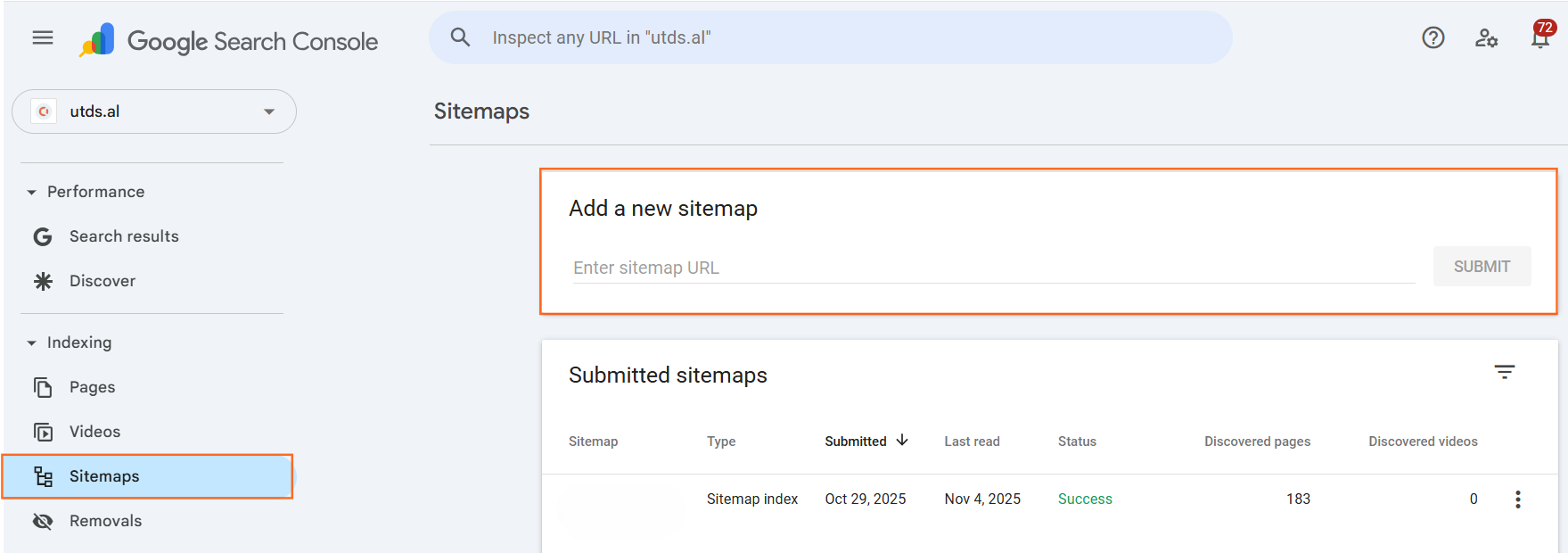
- In the left-hand navigation menu, click Sitemaps (found under the ‘Index’ section).
Step 3: Submit the Sitemap
- You will see a text box under the heading Add a new sitemap. The system automatically prepopulates your domain name.
- In the text box, enter the path to your sitemap file (e.g., type in sitemap.xml or sitemap_index.xml).
- Click the blue Submit button.
Step 4: Verify the Status
- After submission, the sitemap will appear in the table below, labelled Submitted sitemaps.
- The Status column will initially show ‘Pending’ or ‘Success’.
- Check the ‘Discovered URLs’ Column: Over the next few days, Google will process the file. The ‘Discovered URLs’ column will update, showing the number of pages found in your sitemap. If this number is close to the total number of pages on your website, the submission was successful.
Our Advice
1. Multiple Sitemaps
- Note: Many large sites use Sitemap Indexes (e.g., sitemap_index.xml), which simply link to smaller, individual sitemaps for posts, pages, and categories. If you submit the index file, Google will automatically discover all the linked sitemaps. You only need to submit the main index file.
2. Why Use a Sitemap?
- Efficiency: Sitemaps are particularly important for new websites or sites with poor internal linking. They ensure that Google doesn’t miss any of your valuable pages.
- Troubleshooting: GSC will alert you if your sitemap contains URLs that Google can’t access (e.g., pages blocked by robots.txt or pages returning an error), allowing you to fix issues faster.
3. No Need to Resubmit
- Advise: You only need to submit your sitemap once. Once Google knows where the sitemap file is, it will automatically check it regularly for updates.

 Salesforce

