


Step 1: The “2-Week Rule” (Don’t Panic Yet)
When a Core Update rolls out, search results are notoriously volatile. It is common for rankings to drop sharply and then bounce back within 14 days without you touching a single pixel.
- Wait: Do not make drastic changes (like deleting content) for at least 2 weeks after the rollout begins.
- Verify: Check the Google Search Status Dashboard to see if the update is marked as “Completed.”
- Confirm: Check Google Search Console vs Google Analytics.
- If both show a drop, it is real.
- If only GSC shows a drop but Analytics traffic is stable, it might be a reporting bug or a loss of “impressions” from irrelevant queries you didn’t need anyway.
Step 2: Diagnose “Page vs. Site” Drops
You need to identify if Google has devalued your entire website or just one specific topic.
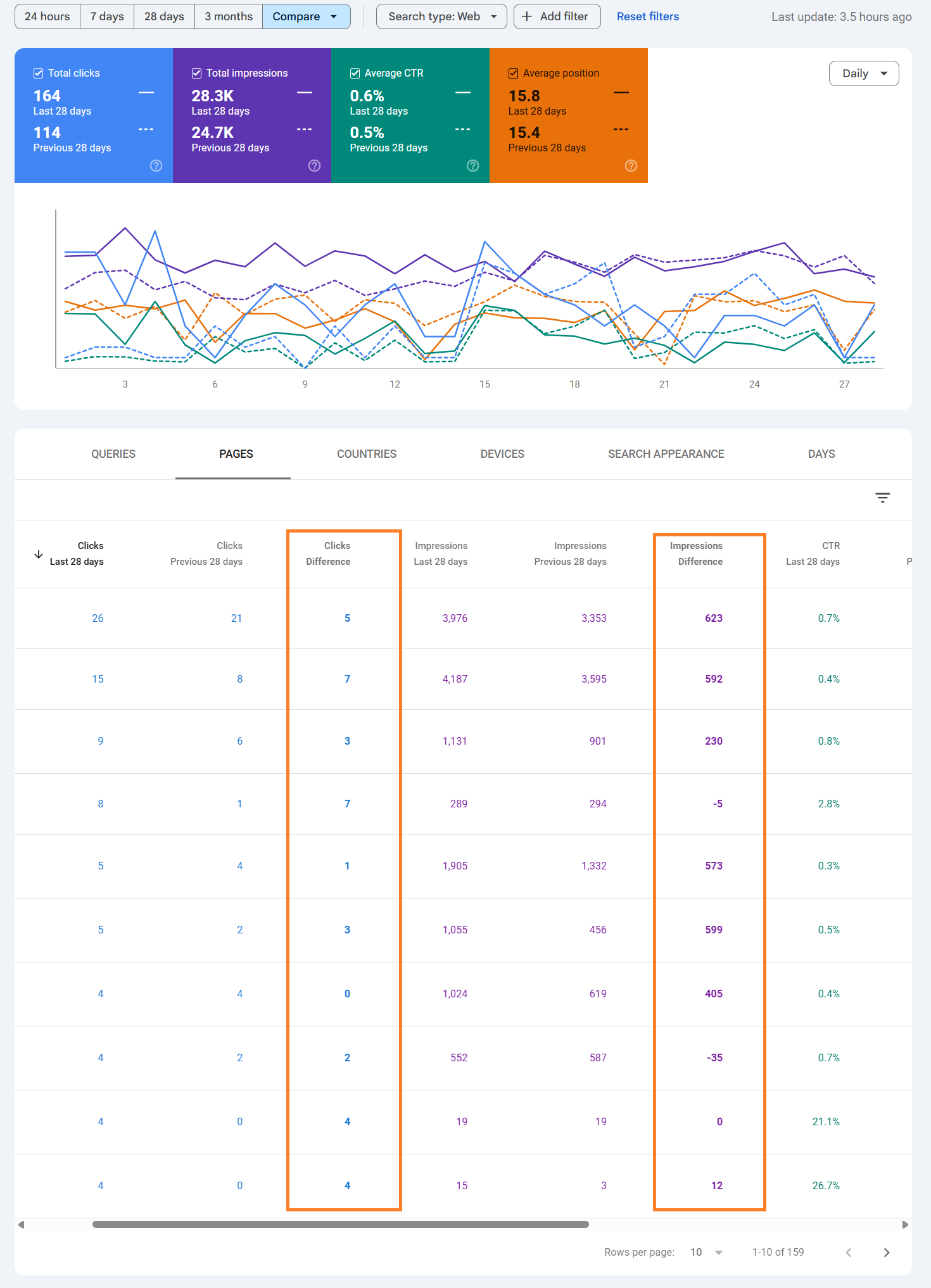
- Navigate: Go to Google Search Console > Performance.
- Compare: Select Date Range > Compare > Last 28 days vs Previous period.
- Sort: Click on the Pages tab and sort by “Clicks Difference” (Ascending) to see the biggest losers.
- Scenario A: If all pages dropped roughly equally, you likely have a Technical or Sitewide Quality issue (e.g., ads, speed, or overall reputation).
- Scenario B: If only one category (e.g., “Reviews”) dropped, Google has devalued that specific content type (likely due to “Helpful Content” signals).
Step 3: The “E-E-A-T” Content Audit
Modern Google updates (specifically the “Helpful Content” system) punish sites that look like they were written by AI or freelancers with no real experience. You must prove Experience, Expertise, Authoritativeness, and Trust (E-E-A-T).
Audit your losing pages against these questions:
- Experience: Does the page prove you actually used the product/service? (e.g., “I tested this boiler for 3 weeks…” vs. “The boiler is good.”)
- Expertise: Is the author a named expert? Add a detailed Author Bio with links to their LinkedIn and credentials.
- Originality: Did you add new data, or just summarize what is already on Wikipedia? Google penalises “Copycat Content.”
Step 4: Technical “Quality” Check
Sometimes an update makes Google’s crawler fussier about technical errors it previously ignored.
- Ads: Did you recently add more ads? The “Page Experience” signal penalises pages where the content is pushed down by a massive ad banner (Interstitials).
- Speed: Check Core Web Vitals in GSC. If your “CLS” (Layout Shift) is high, your page is jumping around while loading, which is a negative ranking factor.
- Cannibalization: Search site:yourdomain.com [keyword]. If 4 different pages appear for the same topic, you are competing with yourself. Merge them into one strong “Power Page.”
Step 5: The “Disavow” File (Last Resort)
If you were hit by a Spam Update specifically, it might be due to “Toxic Backlinks” (spam links pointing to your site) triggering a penalty.
- Audit: Use Semrush or Ahrefs to check your “Toxic Score.”
- Identify: Look for thousands of links from irrelevant, foreign, or gambling sites.
- Action: Create a .txt file listing these bad domains and upload it to the Google Disavow Tool.
- Warning: Only do this if you are 100% sure the links are spam. Disavowing good links will hurt your rankings further.

 Salesforce

