


1. Diagnosis Protocol
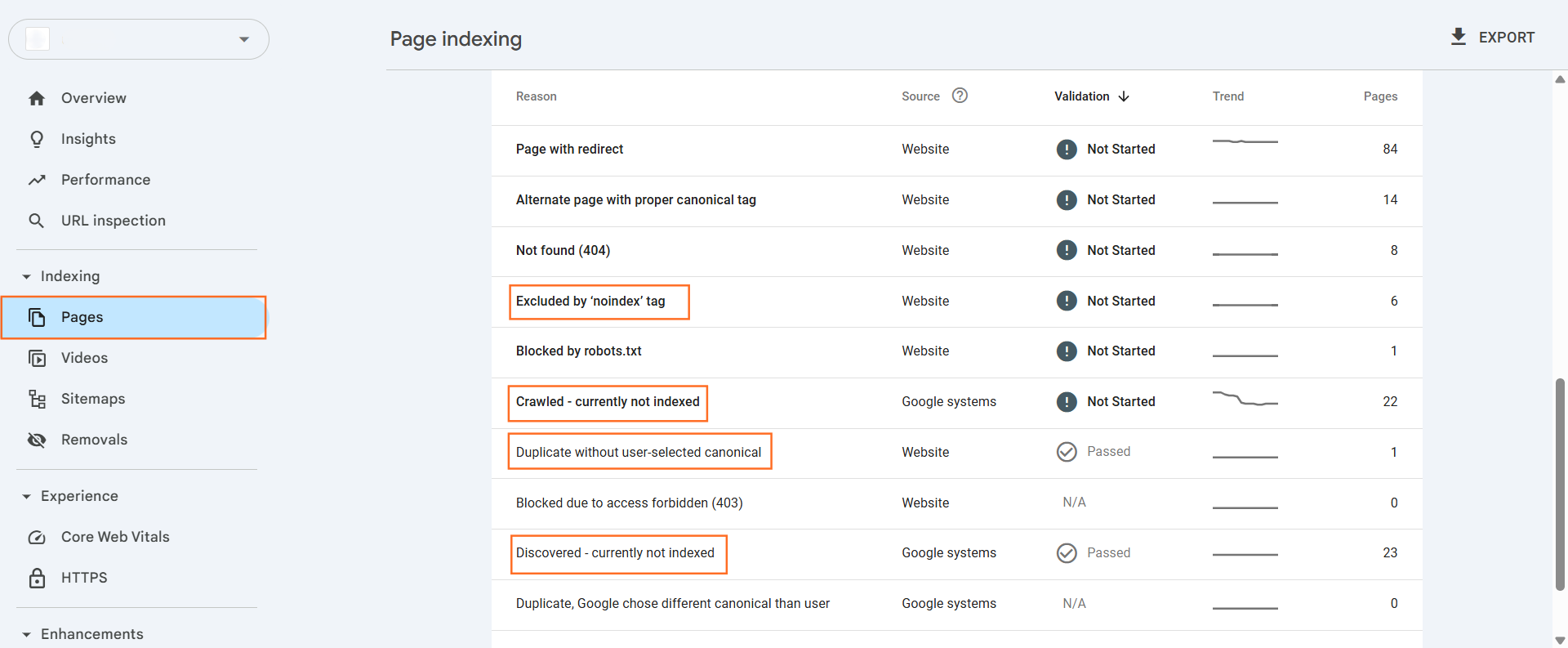
Do not guess. Navigate to the Pages report in Google Search Console (GSC). Identify the specific status label for the Currently Not Indexed. Google classifies non-indexed pages into specific buckets.
2. Status: “Excluded by ‘noindex’ tag”
Googlebot found a directive explicitly instructing it not to index the page.
The Fix:
- Inspect the Source Code: Open the page. Right-click > View Page Source.
- Search: Ctrl+F for noindex.
- Locate: <meta name=”robots” content=”noindex”>.
- Action:
- If intentional: Ignore. (e.g., Admin pages, Checkout, Thank You pages).
- If accidental: Check your SEO plugin settings (Yoast/RankMath) or X-Robots-Tag in the HTTP header. Remove the directive.
Stephan Spencer (SEO Expert): Ensure your robots.txt does not block these pages. If Google cannot crawl the page, it cannot see the noindex tag to process the removal request properly.
3. Status: “Crawled – currently not indexed”
Googlebot visited the page but decided the content was not worth adding to the index. This is a quality or duplication signal, not a technical error.
Common Causes & Fixes:
- Thin/Low Quality Content: The page offers little value or resembles AI-generated spam.
- Fix: Rewrite content to demonstrate E-E-A-T (Experience, Expertise, Authoritativeness, Trustworthiness).
- Duplicate Content: The content is near-identical to another page.
- Fix: Differentiate the content or use a Canonical Tag to point to the primary version.
- False Positives: Sometimes RSS feeds or print-friendly URLs appear here.
- Fix: Ignore if the URL is not a primary user destination.
Lily Ray (Amsive Digital): This status often indicates that Google does not trust the site’s quality threshold. “Pruning” (deleting) low-quality pages can sometimes help the remaining healthy pages get indexed.
4. Status: “Discovered – currently not indexed”
Google knows the page exists (via sitemap or link) but has not crawled it yet to avoid overloading the server. This indicates a Crawl Budget issue.
The Fix:
- Check Server Performance: If your site is slow, Googlebot slows down crawling.
- Check Internal Linking: Orphan pages (pages with zero internal links) are deprioritized. Add links from high-authority pages (like the Homepage).
- Analyze Sitemap: Ensure the sitemap is clean (no 404s or redirects).
Rand Fishkin (SparkToro): Large sites often suffer from “Index Bloat.” If you force Google to crawl 10,000 low-quality pages (filters, tags, parameters), it may stop before reaching your 100 new high-quality pages. Block low-value parameters in robots.txt.
5. Status: “Duplicate without user-selected canonical”
Google found duplicates and chose a version to index, but you did not specify a preference using a canonical tag.
The Fix:
- Decide: Which URL is the “master” version?
- Tag: Add <link rel=”canonical” href=”https://yourdomain.com/master-page” /> to the <head> of the duplicate page.
- Verify: Use the URL Inspection tool to confirm Google accepts your canonical.
Danny Sullivan (Google): Search engines store “word occurrences,” not documents. If two documents have identical word occurrences, the engine will only keep one to save efficiency. You must tell it which one matters.
6. Validation Process
After applying fixes:
- Go to the specific error report in GSC.
- Click “Validate Fix”.
- Wait: This triggers a re-crawl. It is not immediate. It may take 7–28 days.

 Salesforce

