


Google reviews are the single most important trust signal for local businesses. They boost your Google Business Profile (GBP) visibility, increase local search rankings, and significantly improve the Click-Through Rate (CTR) from the local search pack. Collecting them requires a systematic, repeatable process.
Step 1: The Essential Foundation (The Google Review Link)
Before asking for reviews, streamline the process by creating a direct link that takes customers straight to the review form.
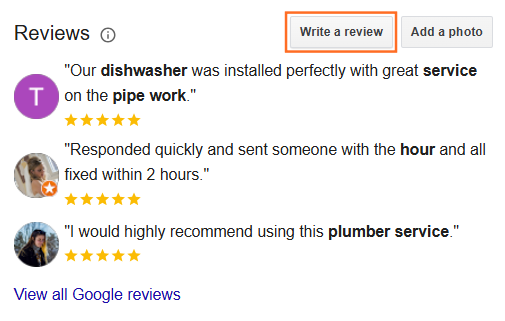
- Find Your Business: Search for your business name on Google.
- Click “Write a Review”: Click the “Write a Review” button on your Google Business Profile listing.
- Copy the URL: A pop-up window will appear with the review form. Copy the entire URL from your browser’s address bar. This is your direct review link.
Step 2: Optimal Strategies for Collection
The most effective strategy is integrating the request into your standard client workflow at the point of maximum satisfaction.
Method | When to Deploy | Optimal UTDS Implementation |
Email Automation | Immediately after project completion or service delivery, when the client is seeing results. | Send a personalized email from the project manager or CEO one week after the project closure meeting, including the direct, shortened review link. |
The “Happy Client” Filter | During the client feedback process. | After asking for private feedback (e.g., via a short survey), if the client gives a high rating (9 or 10), immediately redirect them to the Google review link. If they give a low rating, prompt an internal conversation instead. |
Invoicing/Confirmation | On transactional touchpoints. | Add a polite, branded call-to-action (CTA) with the shortened review link to the footer of your final invoice and project completion documentation. |
Physical Signage | For businesses with a physical location or face-to-face meetings. | Print branded business cards or flyers with the shortened URL and a QR Code that links directly to the review form. Hand this to the client upon project sign-off. |
Website Placement | On high-traffic, non-conversion pages. | Place a small, persistent banner or widget on your Contact Us page, About Us page, or Knowledge Base pages. |
Step 3: Crucial Guidelines (Compliance)
To maintain compliance with Google’s policies and avoid penalties:
- NEVER Offer Incentives: You cannot offer money, discounts, gifts, or any form of compensation in exchange for a review. You can only ask for honest feedback.
- NEVER Post Reviews for Clients: It is against Google’s policy to post a review on behalf of a customer using your own or the customer’s account.
- Be Inclusive: Ask all satisfied customers for a review, not just a select few. If you selectively ask only those who you know will leave a 5-star rating, Google may flag this behavior.
Step 4: Responding to Reviews (Completing the Cycle)
Responding to every review, both positive and negative, is crucial for two reasons:
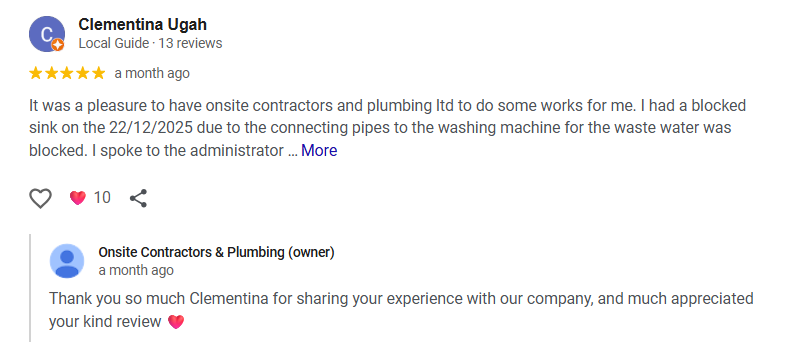
- Positive Reviews: Thank the customer and mention the service you provided (e.g., “Thanks for the kind words about our Digital Strategy Audit!”). This adds fresh, relevant keywords to your GBP profile.
- Negative Reviews: Respond professionally, apologize for the issue, and offer to resolve it offline (e.g., “We are sorry to hear this. Please call us at [Phone Number] so we can make this right.”). Never argue or reveal sensitive customer information.

 Salesforce

