


Viewing performance data broken down by device (computers, mobile phones, and tablets) is critical for understanding where your budget is best spent and for setting strategic bid adjustments.
Step-by-Step Guide
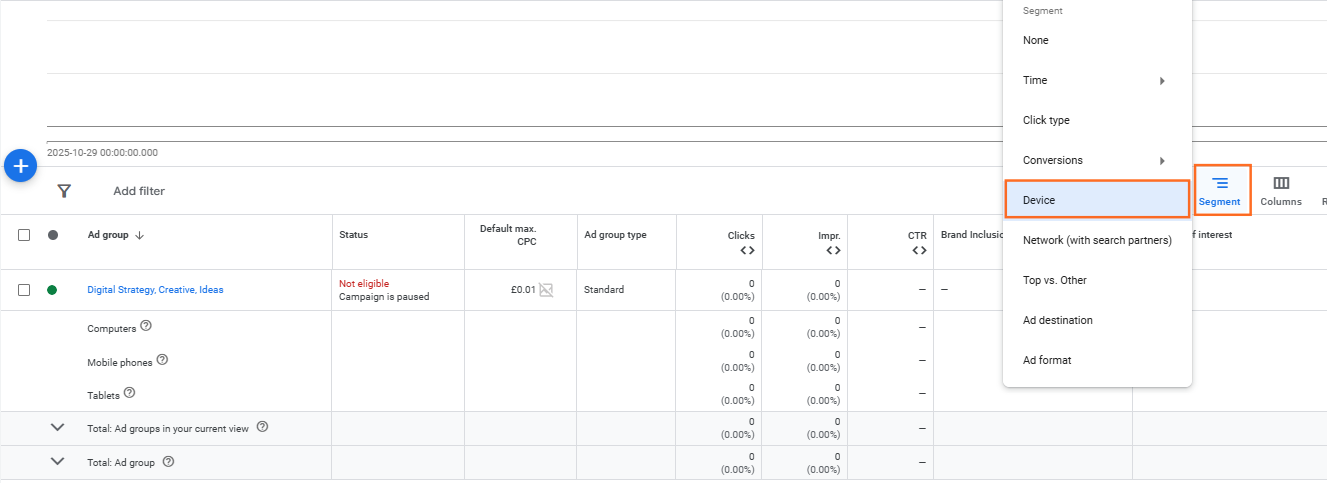
Step 1: Navigate to the Campaign or Ad Group Level
- Sign in to your Google Ads account.
- In the left-hand navigation menu, click Campaigns or Ad groups. (You must select a campaign or ad group to view its device data).
Step 2: Segment the Data by Device
- Look for the Segment button located directly above the statistics table.
- Click Segment, then hover over Device.
- Select Device from the sub-menu.
Step 3: Review the Device Breakdown
- Your main data table (e.g., the Campaigns table) will now expand, showing multiple rows for each campaign one for Computers, one for Mobile phones, and one for Tablets.
- Review key metrics like Cost, Conversions, and Conversion Rate side-by-side for each device type to identify performance differences.

 Salesforce

