


Step 1: Identify the “Low-Hanging Fruit”
You cannot fix what you cannot find. The biggest opportunities are pages that rank on Page 1 (Positions 1 – 10) but have a below-average CTR (typically under 3%).
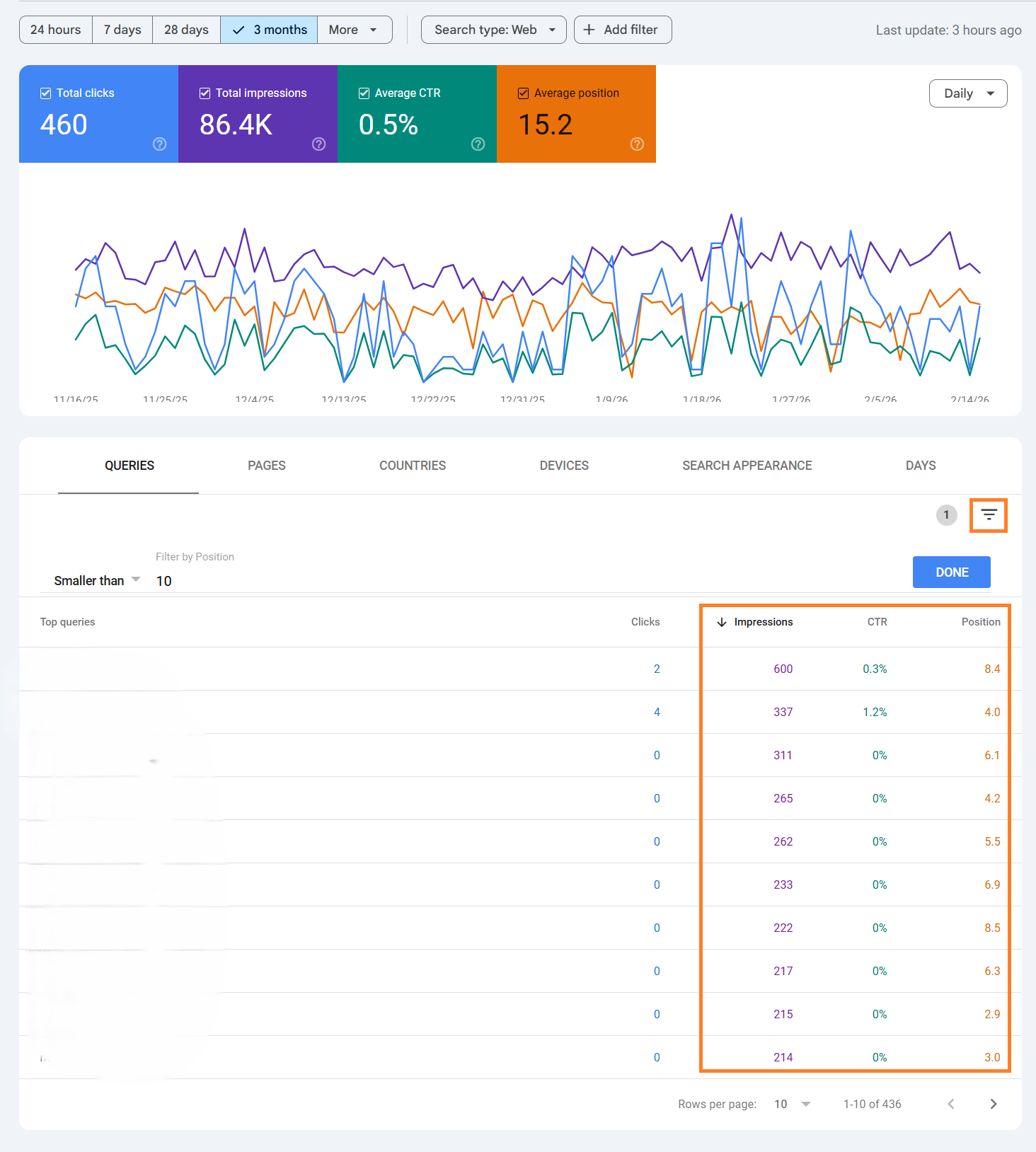
- Open GSC: Go to Performance > Search results.
- Enable Metrics: Click Average CTR and Average Position so all four coloured boxes are active.
- Filter: Click the filter icon > Position > Smaller than 10 (to see only Page 1 rankings).
- Sort: Sort the table by Impressions (High to Low).
- Hunt: Look for rows with high impressions but low CTR (e.g., 1%). These users are seeing you but choosing a competitor.
Step 2: Optimise the “Title Link” (The Hook)
Your Title Tag is the single most important factor for CTR. If it is boring or truncated, users will scroll past.
- Add Brackets: Studies show titles with brackets like [2024 Guide] or (Free Template) have a higher CTR.
- Use Numbers: 7 Ways to… usually beats How to….
- Front-Load Keywords: Ensure the main keyword is near the start.
- Bad: “Welcome to our website – Boiler Repair”
- Good: “Emergency Boiler Repair in London | 24/7 Callout”
- Check Length: Keep it under 60 characters to prevent Google from cutting it off with an ellipsis (…).
Step 3: Rewrite the Meta Description (The Sales Pitch)
While the Meta Description does not directly affect ranking, it acts as your “ad copy.” A generic or missing description forces Google to scrape random text from your page, which looks messy.
- Active Voice: Start with a verb. “Learn how to…” or “Buy the best…”
- Include the USP: Why click you? “Free shipping,” “24/7 support,” “Rated 5 stars.”
- Bold Keywords: Google bolds the words in the description that match the user’s search query. Include the target keyword naturally to catch the eye.
- Length: Keep it between 120 – 155 characters.
Step 4: Add Rich Results (The Visuals)
Standard blue links are boring. “Rich Results” (Star ratings, Images, Prices) make your listing physically larger and more attractive.
- Review Schema: Use aggregate rating schema to show “★★★★★” next to your link.
- Product Schema: If selling goods, display the Price (£50.00) and Availability (In Stock) directly in the search result.
- Recipe/Event Schema: Show thumbnails or dates.
- Note: You must use valid Schema Markup (JSON-LD) to be eligible for this.
- Note: You must use valid Schema Markup (JSON-LD) to be eligible for this.
Step 5: Update the “Freshness” Date
Users are biased towards new information. They will almost always click a result from “2024” over one from “2021.”
- Update Content: Review your page, add a new paragraph, or update the statistics.
- Update Date: Change the Published or Last Updated date in your CMS (WordPress usually handles this).
- Show it: Ensure your theme displays “Last Updated: [Date]” at the top of the post. Google often picks this up and displays it in the search snippet (e.g., “5 days ago”).

 Salesforce

