


Public Groups are collections of individual users, roles, or other groups. They are used to simplify the process of sharing records, folders, and resources with a specific set of people without having to add them one by one.
Step 1: Creating a New Public Group
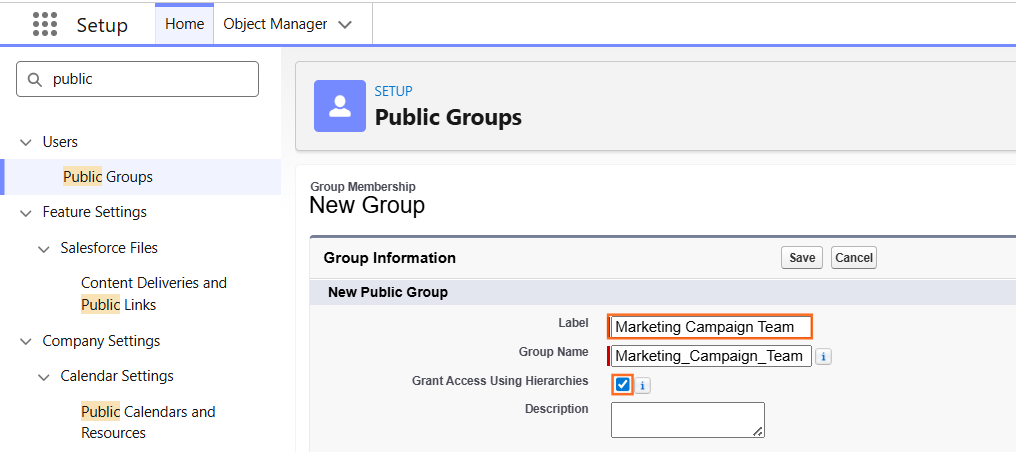
- Navigate to Setup.
- In the Quick Find box, type Public Groups.
- Select Public Groups and click New.
- Label: Enter a descriptive name (e.g., Marketing Campaign Team).
- Group Name: This API name will populate automatically.
- Grant Access Using Hierarchies: * If checked, managers of the group members will also receive the same access granted to the group.
- If unchecked, only the specific members in the group receive access.
Step 2: Adding Members to the Group
In the Search dropdown, you can select different categories of members to add:
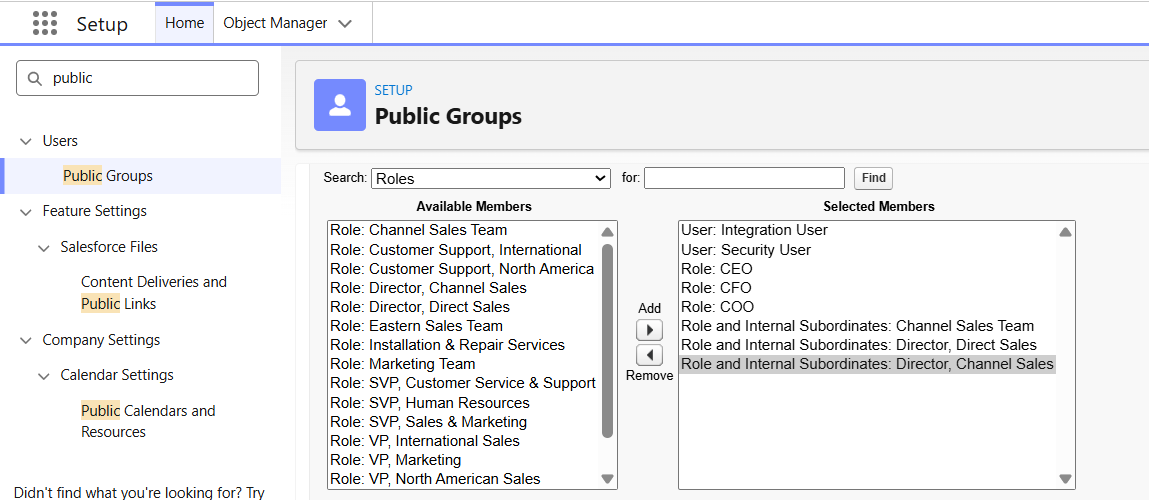
- Users: Select individual people.
- Roles: Add everyone assigned to a specific role.
- Roles and Subordinates: Add everyone in a role plus everyone below them in the hierarchy.
- Other Public Groups: Nest an existing group inside the new one.
Select the members from the Available Members list and click Add to move them to the Selected Members list. Click Save.
Step 3: Common Use Cases
In your instructional guide, it is helpful to list where these groups are actually applied:
Feature | How Public Groups are Used |
Sharing Rules | To share a set of records with a specific team. |
Folder Sharing | To grant access to Report or Dashboard folders. |
List Views | To make a specific List View visible only to group members. |
Content Libraries | To manage who can view or edit files in a library. |
Step 4: Technical Considerations
- Maintenance: When a user’s role changes or they leave the company, their access via “Roles” or “Users” in the Public Group updates automatically, but it is best practice to audit group memberships quarterly.
- Limits: While there is no hard limit on the number of groups, having excessively large groups with complex nesting can impact the performance of sharing calculations.
- Visibility: Public Groups are managed by administrators; end-users cannot typically create their own groups (unlike “Personal Groups”).

 Salesforce

