


Renaming a field in Salesforce involves updating the Field Label, which is what users see, while keeping the API Name (Field Name) the same to ensure that existing reports, formulas, and integrations do not break.
Step 1: Update the Field Label
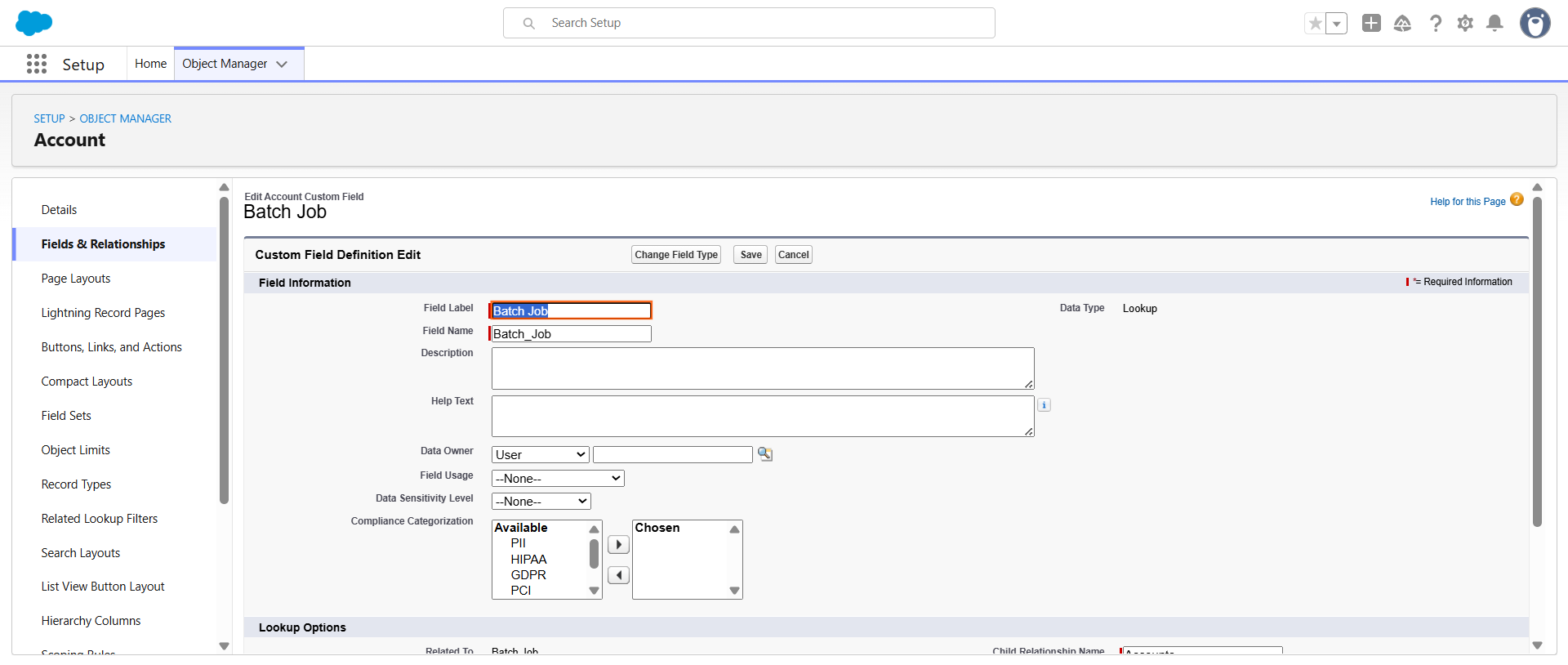
- Navigate to Setup > Object Manager.
- Select the Object containing the field.
- Click Fields & Relationships.
- Find the field you wish to rename and click Edit.
- Change the text in the Field Label box. ( this works only with Custom fields)
- Crucial: Do not change the Field Name (API Name).
- Click Save.
Step 2: Why this preserves Reports
Reports in Salesforce reference the API Name of a field to pull data. When you only change the Field Label:
- The column header in existing reports will automatically update to the new label.
- The underlying report metadata remains linked to the original API Name.
- Dashboards and filters using that field will continue to function without intervention.
Step 3: Impact Assessment
While reports remain intact, consider the following instructional points for your guide:
Component | Status after Label Change | Action Required |
Existing Reports | Functional | None; headers update automatically. |
Report Filters | Functional | None. |
Page Layouts | Functional | None; label updates on the UI. |
User Training | Affected | Update internal documentation to reflect the new name. |
Step 4: When the API Name must be changed
If you are forced to change the API Name for consistency or technical reasons, you must manually update:
- Every Report Filter using that field.
- All Custom Formula Fields referencing the old API Name.
- Validation Rules and Flows.
- External integrations or API calls.

 Salesforce

